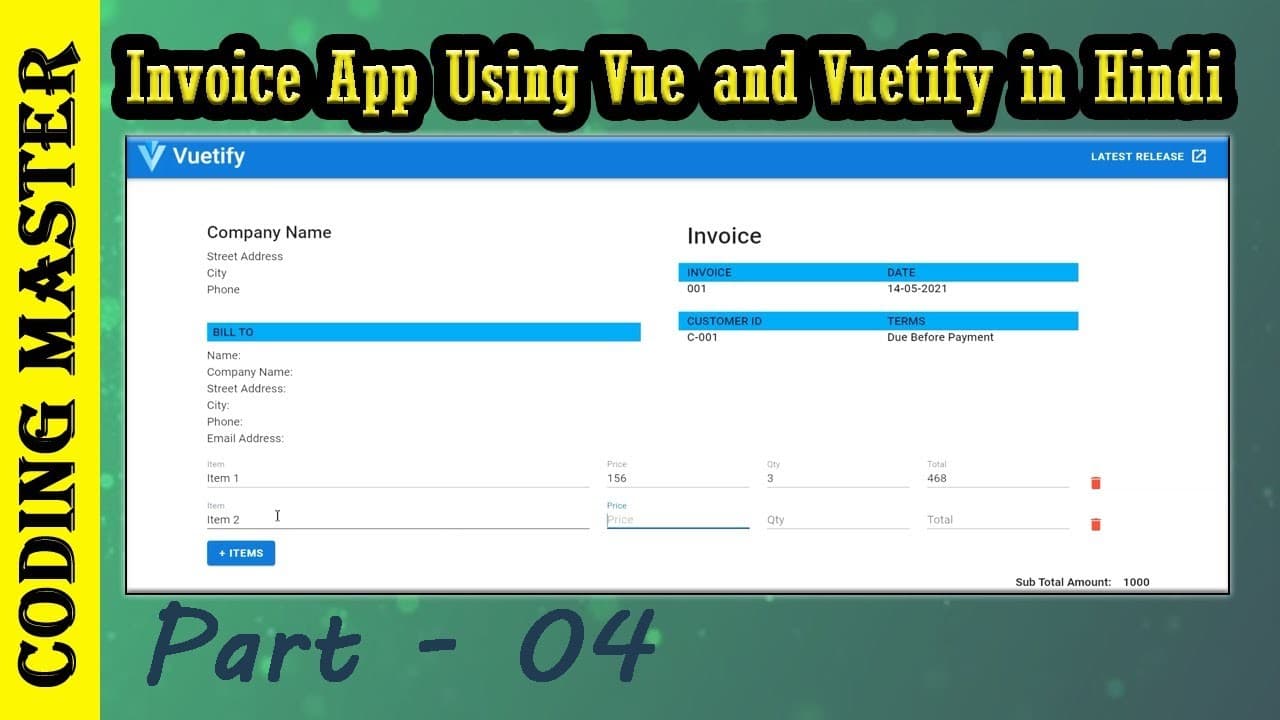
Vue Vuetify Invoice Calculator
<template>
  <v-container fluid>
    <v-row class="mt-10">
      <v-col cols="12" md="6">
        <h4>
          Company Name
        </h4>
        <p>
          Street Address<br />
          City<br />
          Phone<br />
        </p>
        <h6 class="light-blue py-1 mt-9 pl-2 mr-10">BILL TO</h6>
        <p>
          Name:<br />
          Company Name:<br />
          Street Address:<br />
          City:<br />
          Phone:<br />
          Email Address:<br />
        </p>
      </v-col>
      <v-col cols="12" md="6">
        <h2>
          Invoice
        </h2>
        <h6 class="mt-5">
          <v-layout row wrap>
            <v-flex xs5 class="light-blue py-1">
              <span>INVOICE</span><br />
            </v-flex>
            <v-flex xs5 class="light-blue py-1">
              <span>DATE</span><br />
            </v-flex>
          </v-layout>
          <v-layout row wrap>
            <v-flex xs5>
              <span>001</span>
            </v-flex>
            <v-flex xs5>
              <span>14-05-2021</span>
            </v-flex>
          </v-layout>
          <v-layout row wrap class="mt-9">
            <v-flex xs5 class="light-blue py-1">
              <span>CUSTOMER ID</span><br />
            </v-flex>
            <v-flex xs5 class="light-blue py-1">
              <span>TERMS</span><br />
            </v-flex>
          </v-layout>
          <v-layout row wrap>
            <v-flex xs5>
              <span>C-001</span>
            </v-flex>
            <v-flex xs5>
              <span>Due Before Payment</span>
            </v-flex>
          </v-layout>
        </h6>
      </v-col>
    </v-row>
    <div v-for="(itemRow, i) in itemRows" :key="i">
      <v-row align="center">
        <v-col cols="12" sm="5" md="5">
          <v-text-field
            label="Item"
            placeholder="Item"
            v-model="item[i]"
            dense
          ></v-text-field>
        </v-col>
        <v-col cols="12" sm="2" md="2">
          <v-text-field
            label="Price"
            placeholder="Price"
            v-model="price[i]"
            dense
          ></v-text-field>
        </v-col>
        <v-col cols="12" sm="2" md="2">
          <v-text-field
            label="Qty"
            placeholder="Qty"
            v-model="qty[i]"
            @blur="calcTotal(i)"
            dense
          ></v-text-field>
        </v-col>
        <v-col cols="12" sm="2" md="2">
          <v-text-field
            label="Total(₹)"
            placeholder="Total(₹)"
            type="number"
            readonly
            v-model="total[i]"
            @focus="calcTotal(i)"
            @blur="calcTotal(i)"
            dense
          ></v-text-field>
        </v-col>
        <v-col cols="12" sm="1" md="1">
          <v-icon medium color="red darken-1" @click="removeItem(i)"
            >mdi-delete</v-icon
          >
        </v-col>
      </v-row>
    </div>
    <v-btn @click="addItem" class="primary">+ Items</v-btn>
    <div class="float-right mt-12">
      <div class="text--primary font-weight-bold">
        <span class="float-left mr-4">Sub Total Amount:</span>
        <span class="float-right">1000</span>
        <br />
        <span class="float-left mr-4">Tax Rate:</span>
        <span class="float-right">18%</span>
        <br />
        <span class="float-left mr-4">Tax:</span>
        <span class="float-right">18</span>
        <br />
        <span class="float-left mr-4">Total:</span>
        <span class="float-right">{{ gtotal }}</span>
        <br />
        <br />
      </div>
    </div>
  </v-container>
</template>

<script>
export default {
  components: {},
  created() {
    this.addItem();
  },
  data: () => ({
    itemRows: [],
    item: [],
    qty: [],
    price: [],
    total: [],
    gtotal: '',
  }),
  methods: {
    calcTotal(i) {
        let price = this.price[i];
        let qty = this.qty[i];
        let total = price * qty;
        this.total[i] = parseInt(total);
        this.gtotal = parseInt(total);


        console.log("Inside Calc Total: " + this.total[i]);
    },
    addItem() {
      this.itemRows.push({
        item: "",
        qty: "",
        price: "",
        total: "",
      });
    },
    removeItem(index) {
      this.itemRows.splice(index, 1);
    },
  },
};
</script>